Group Calls Are Now Available on the Desktop
Mobile instant messengers became popular as a replacement for SMS messages. Today, they are one of the most widely used Internet services and are no longer limited to written communication – voice messages and video calls are now just as much a part of chat apps as text messages.
Thus, end-to-end encrypted single and group calls have been available in Threema for quite some time. Until now, however, Threema calls could only be made on mobile devices. With the latest beta version of Threema 2.0 for desktop, it’s also possible to start and join (video) group calls from the comfort of your computer.
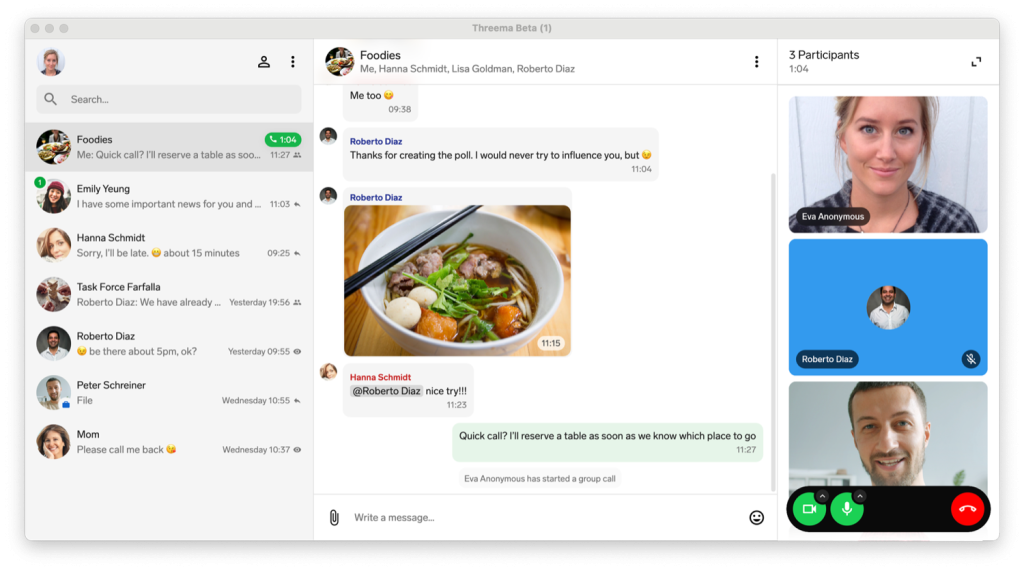
Whether it’s a quick chat with a group of friends or a work meeting: you no longer need to pick up your mobile device to conduct a group call.
At the moment, this feature is only available in the new desktop app, which can be used by iOS users as a beta version. Support for Android devices is in development. For more information about the beta version of Threema 2.0 for desktop, please refer to this FAQ article.
Here’s how to start a group call on the computer:
Open the beta version of Threema 2.0 for desktop, and select the group chat in which you want to start a call
Click on the phone icon at the top right in the title bar
All group members receive a notification inviting them to join the call
Please note, only group calls are supported in Threema’s new desktop app at the moment. Single calls are based on a different technology and are currently in development. As a workaround, you can create a group containing you and the contact you wish to call.
To learn what else the latest update of Threema 2.0 for desktop includes, please refer to the changelog.







