How can tags be used to automatically create distribution lists and groups in Threema Broadcast?
Tags allow to categorize and segment users. These tags can be used to automatically create distribution lists and centrally managed groups in Threema Broadcast so that messages can be sent to specific departments, divisions, etc. in a targeted manner.
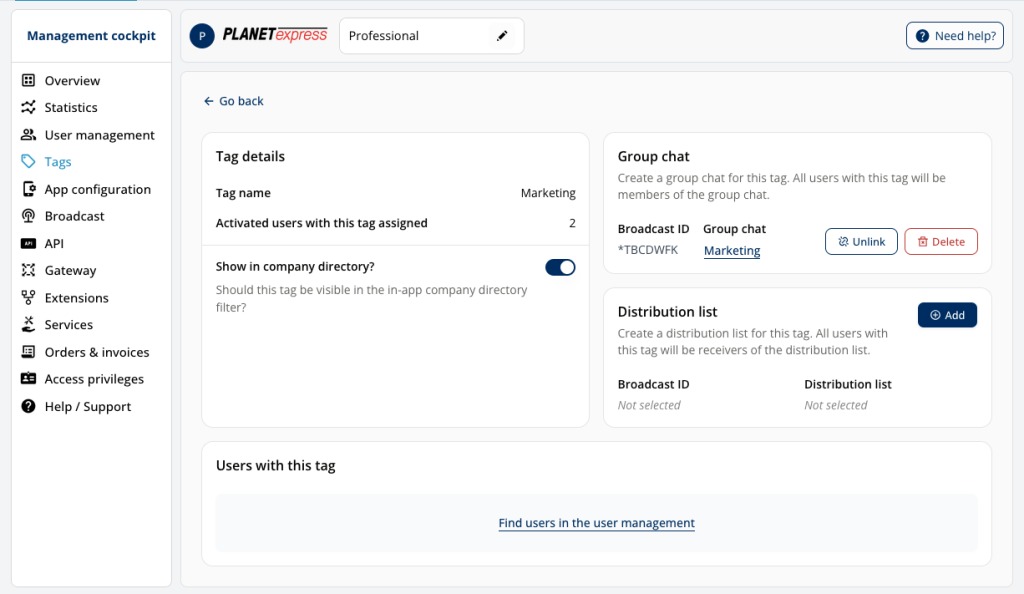
To set up distribution lists and groups using tags, select the desired tag in the “Tags” menu item. You can then specify in the details view whether you want to create a new distribution list or group or synchronize an existing one. You can also change the name of newly created distribution lists and groups.
Important: If you synchronize an existing distribution list or group, all previous users who don’t have the corresponding tag assigned will be removed.
Tags can be added to users or changed at a later date, allowing flexible customization of distribution lists and groups.







