Bots: Retrieve Information Directly in the Chat App
Threema Work is not only a messaging app for businesses, it is also a practical tool for making information quickly and easily accessible. With the help of bots, it’s possible to set up interactive systems that automatically provide users with answers to frequently asked questions.
Generally speaking, bots are applications that perform certain tasks automatically. With Threema Work, administrators can specify in the management cockpit which questions the bots should answer and what automatic responses they should give. This creates a system that allows users to obtain the information they are looking for directly in the familiar chat environment.
For example, bots allow users to access internal information securely and without VPN access directly on their smartphone. This is particularly useful when they are on the go or when the usual information channels are not available.
What can bots be used for in Threema Work?
Bots can be useful in variety of scenarios:
Providing important information in an emergency: Bots can be used to make emergency plans and other crisis management information available as automatic replies, regardless of where people are located.
Answering frequently asked questions about IT problems: Where is the Wi-Fi password stored? How do I set up the printer? Recurring problems and initial troubleshooting questions can be easily solved and answered by a bot, reducing the workload on the IT team.
Providing instructions: Whether it’s guidelines for labeling documents or instructions for cleaning the coffee machine, make instructions available in a bot so that employees can access them anytime, anywhere.
Providing documents during the onboarding process: New employees often have to wade through a lot of new documents and guidelines to get an overview. Provide links to the most important documents and information via a bot so that new employees don’t have to spend time searching for them in different places.
Storing product information: In manufacturing or sales, it can be useful to be able to access product information such as item numbers, dimensions, ingredients, etc. directly on a smartphone.
Storing public holidays: Public holidays can be added to a bot and easily retrieved via a command.
Privacy Quiz
Bots can also be used to set up interactive knowledge quizzes. One example is Threema’s privacy quiz: send “quiz” to the Threema ID *THREEMA and test your knowledge about data protection.
How can bots be set up in Threema Work?
To set up a bot, open the “Bots” menu item in the management cockpit, and select “New bot.”
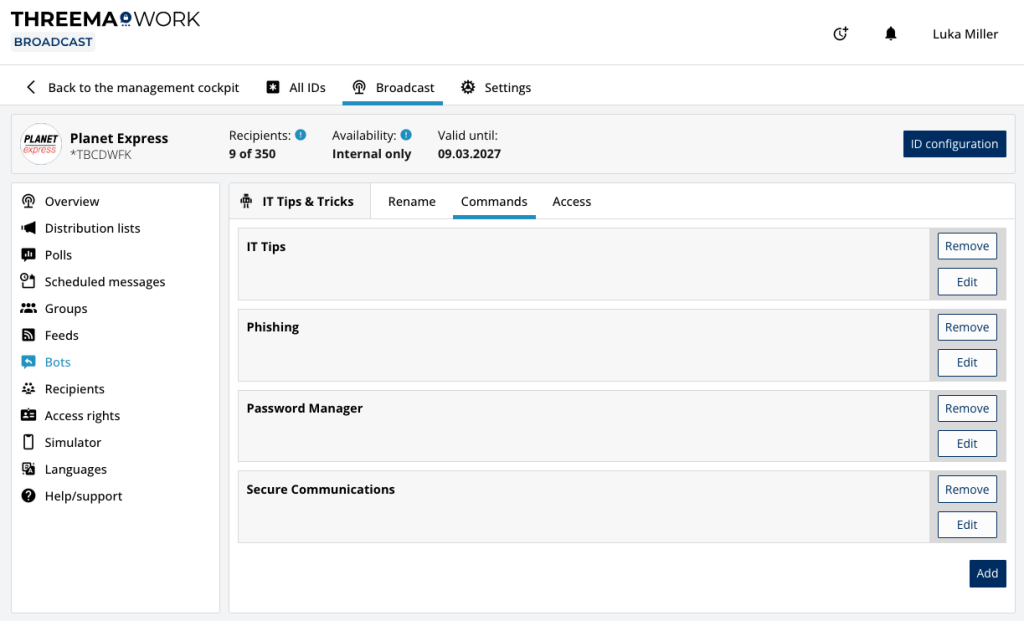
Once you have created the bot, navigate to the “Commands” tab, and click the “Add” button to add new commands. In the screenshot below, four commands (“IT Tips,” “Phishing,” “Password Manager,” and “Secure Communication”) have already been added.
If a user now wants to address the “IT Tips & Tricks” chat bot, they can do so with the command “it tips” to the broadcast ID. Immediately after sending the message, they will receive the predefined output for this command.
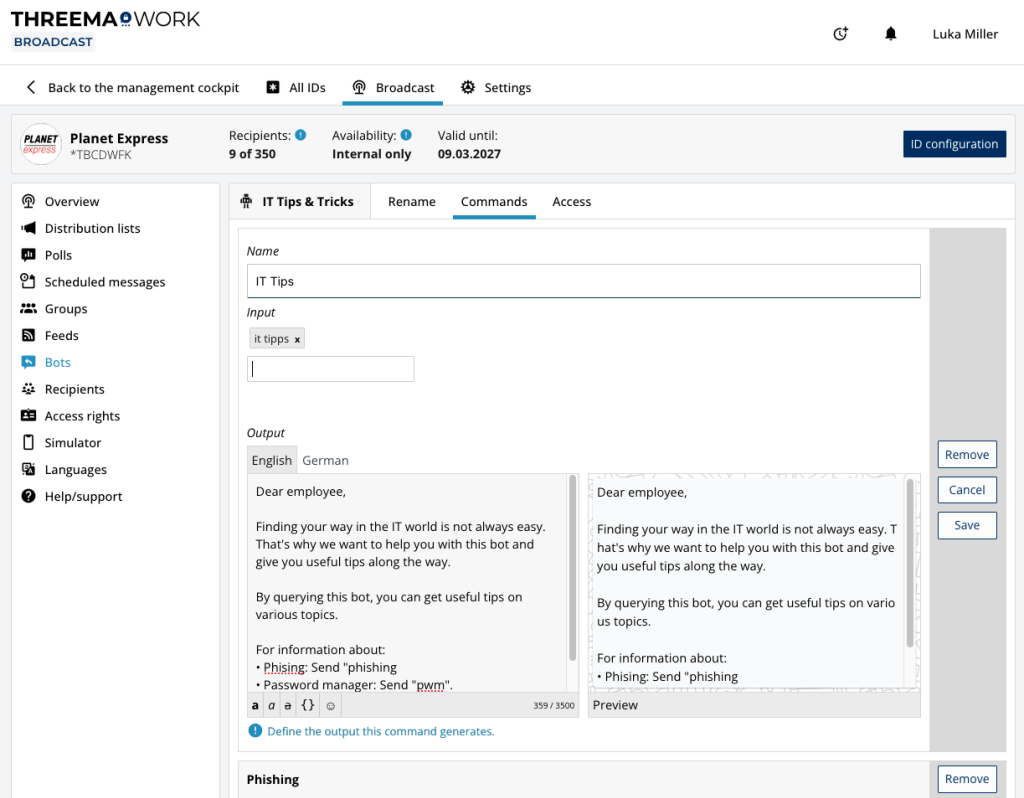
Similarly, a message can be defined that is returned if the bot receives an unknown command. This message can contain possible commands, for example, so that users know what they can query via this bot.







